> ## Documentation Index
> Fetch the complete documentation index at: https://dicksontsai.com/llms.txt
> Use this file to discover all available pages before exploring further.
# The Most Minimalist DIY Diary
> Published February 19, 2024
Over the last few years, I've been on a quest to find a diary format simple
enough for me to commit to daily usage without any effort. I'm now very
satisfied with my final iteration, a suite of Siri Shortcuts, but I also learned
a lot about designing habit-forming processes along the way.
 ## First Attempt: Google Doc (2018 - 2021)
I knew that to get myself started on any diary habit, I had to reduce my day
down to three simple questions:
* What did I eat for lunch?
* What did I eat for dinner?
* What else did I do out of the ordinary (e.g. brushing teeth, etc.) on this
day? (and other miscellaneous notes/learnings)
I would then fill out the answers in a Google Doc. This format worked well for
about three years, which, given my laziness, was quite the accomplishment. I
even wrote a brief
[Python script](https://gist.github.com/dicksontsai/128c8ae4c5645c63e1116d8b2da624df)
to populate the date headers when I started a new doc every month.
## First Attempt: Google Doc (2018 - 2021)
I knew that to get myself started on any diary habit, I had to reduce my day
down to three simple questions:
* What did I eat for lunch?
* What did I eat for dinner?
* What else did I do out of the ordinary (e.g. brushing teeth, etc.) on this
day? (and other miscellaneous notes/learnings)
I would then fill out the answers in a Google Doc. This format worked well for
about three years, which, given my laziness, was quite the accomplishment. I
even wrote a brief
[Python script](https://gist.github.com/dicksontsai/128c8ae4c5645c63e1116d8b2da624df)
to populate the date headers when I started a new doc every month.
 What's cool about this approach is that Google Drive can search the text written
in these docs. For example, I've used this feature to report the number of times
I dined at Benihana to my friends' amusement. The doc format enables me to
record more thoughts as they come up on a particular day.
Nevertheless, I began to miss entries when I would go directly to sleep after
strenuous days. The 3-4 extra clicks it took for me to bring up a Google Docs
editor on my phone became an insurmountable obstacle. Also, I occasionally
forgot to bootstrap a new doc at the start of the month, causing myself to miss
entries as well. Then, I would spend a long time catching up on the days I
missed. Catching up was painful, because I had to cross-reference other sources
such as my credit card statements. Suddenly, I started to dread this activity.
By 2021, I would go days at a time without filling out this doc.
I learned that regardless of the diary format, if I fall behind, then I cannot
get myself to catch up.
## Second Attempt: Daily Email to Google Form (January 2022 - September 2022)
To fix my first attempt, I had to guard against falling behind. I thought a
daily reminder around bedtime would be effective. I found that Google Apps
Script made it easy to send myself an email every day to a Google Form that I
could fill out about my day. The \~20 lines of code are below.
```javascript theme={null}
// Code.gs function sendFormEmail() { var emailAddress = "my_email@gmail.com";
var htmlMessage =
HtmlService.createHtmlOutputFromFile("diary_form.html").getContent(); var
subject = "2022 Diary"; var message = ""; MailApp.sendEmail(emailAddress,
subject, message, { htmlBody: htmlMessage }); }
```
```html theme={null}
```
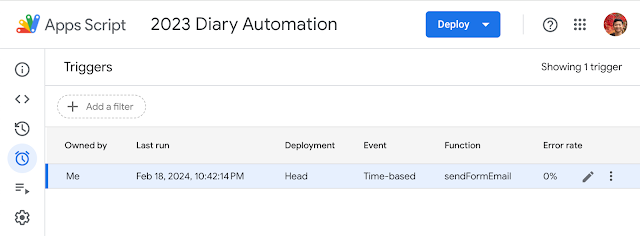
After creating these two files, there are just two more additional steps. First,
add the "Gmail API" to services. Then, create a trigger to run the
sendFromEmail() function every day sometime between 10-11 PM.
What's cool about this approach is that Google Drive can search the text written
in these docs. For example, I've used this feature to report the number of times
I dined at Benihana to my friends' amusement. The doc format enables me to
record more thoughts as they come up on a particular day.
Nevertheless, I began to miss entries when I would go directly to sleep after
strenuous days. The 3-4 extra clicks it took for me to bring up a Google Docs
editor on my phone became an insurmountable obstacle. Also, I occasionally
forgot to bootstrap a new doc at the start of the month, causing myself to miss
entries as well. Then, I would spend a long time catching up on the days I
missed. Catching up was painful, because I had to cross-reference other sources
such as my credit card statements. Suddenly, I started to dread this activity.
By 2021, I would go days at a time without filling out this doc.
I learned that regardless of the diary format, if I fall behind, then I cannot
get myself to catch up.
## Second Attempt: Daily Email to Google Form (January 2022 - September 2022)
To fix my first attempt, I had to guard against falling behind. I thought a
daily reminder around bedtime would be effective. I found that Google Apps
Script made it easy to send myself an email every day to a Google Form that I
could fill out about my day. The \~20 lines of code are below.
```javascript theme={null}
// Code.gs function sendFormEmail() { var emailAddress = "my_email@gmail.com";
var htmlMessage =
HtmlService.createHtmlOutputFromFile("diary_form.html").getContent(); var
subject = "2022 Diary"; var message = ""; MailApp.sendEmail(emailAddress,
subject, message, { htmlBody: htmlMessage }); }
```
```html theme={null}
```
After creating these two files, there are just two more additional steps. First,
add the "Gmail API" to services. Then, create a trigger to run the
sendFromEmail() function every day sometime between 10-11 PM.
 The result is actually pretty neat. And if I miss any days, I can go to the
Google Form responses sheet and edit it directly. The sheet itself provides
better data organization than the previous Google Docs, as each Google Form
question becomes a column in the Google Sheet.
The result is actually pretty neat. And if I miss any days, I can go to the
Google Form responses sheet and edit it directly. The sheet itself provides
better data organization than the previous Google Docs, as each Google Form
question becomes a column in the Google Sheet.
 Surprisingly, this approach performed even worse than my first attempt. By the
fourth month, I was already sick of this format.
One critical factor was email procrastination -- with so many other messages
that I put off in my inbox, the diary email became yet another message to ignore
for later.
Furthermore, the UI of the Google Form discouraged me from keeping up. At first,
I set all questions as "required", after which filling the form became a long
ordeal. Then, even after I updated all of the questions to "optional", I had to
scroll through all the questions that I missed, which made me feel guilty about
skipping them. If I increased my daily triggering frequency to hourly, my inbox
would have appeared too overwhelming with demands to fill out my diary.
I needed some solution that combined some notion of daily/hourly reminders with
a less cumbersome UI.
## Final Attempt: Siri Shortcuts (January 2024 - Present)
Around mid-2023, I have gone about a whole year without a diary solution. I
started playing around with Siri Shortcuts after someone at work asked how often
people opened the Google app from various iOS entrypoints. Wouldn't a "History
of the Day" shortcut that led users to search "this day in history" on Google
lead to more queries? I made a
[Youtube Shorts tutorial](https://www.youtube.com/shorts/J-byHskxuXE) about
setting up such a shortcut.
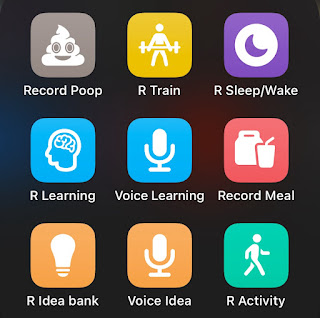
The key breakthrough came when I realized that I could break up my diary prompts
into a number of different shortcuts. Each shortcut would add a timestamp and
some additional text to a note dedicated to that shortcut. Some activities in
particular, like going to the gym, didn't even need text input -- I could just
press the shortcut to record that activity!
Surprisingly, this approach performed even worse than my first attempt. By the
fourth month, I was already sick of this format.
One critical factor was email procrastination -- with so many other messages
that I put off in my inbox, the diary email became yet another message to ignore
for later.
Furthermore, the UI of the Google Form discouraged me from keeping up. At first,
I set all questions as "required", after which filling the form became a long
ordeal. Then, even after I updated all of the questions to "optional", I had to
scroll through all the questions that I missed, which made me feel guilty about
skipping them. If I increased my daily triggering frequency to hourly, my inbox
would have appeared too overwhelming with demands to fill out my diary.
I needed some solution that combined some notion of daily/hourly reminders with
a less cumbersome UI.
## Final Attempt: Siri Shortcuts (January 2024 - Present)
Around mid-2023, I have gone about a whole year without a diary solution. I
started playing around with Siri Shortcuts after someone at work asked how often
people opened the Google app from various iOS entrypoints. Wouldn't a "History
of the Day" shortcut that led users to search "this day in history" on Google
lead to more queries? I made a
[Youtube Shorts tutorial](https://www.youtube.com/shorts/J-byHskxuXE) about
setting up such a shortcut.
The key breakthrough came when I realized that I could break up my diary prompts
into a number of different shortcuts. Each shortcut would add a timestamp and
some additional text to a note dedicated to that shortcut. Some activities in
particular, like going to the gym, didn't even need text input -- I could just
press the shortcut to record that activity!
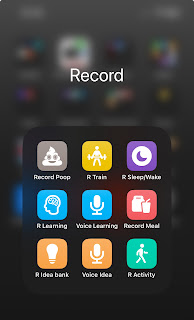 The most beautiful part of Siri Shortcuts is that *I can put my own automation
on my home screen without writing any code*. I formed a single app group with
all my diary shortcuts and placed it at the bottom bar for easy access.
I've found this solution to be the best fit because I can populate my thoughts
**incrementally** throughout the day. Now, I don't have to deal with cursor
navigation on Google Docs nor sift through my noisy email inbox just to fill out
a Google Form about my day.
How do I keep my diary habit up daily with this approach? Well one of the
shortcuts is about recording when I sleep/wake up. Naturally, to get to that
shortcut, I end up displaying the other shortcuts I need to fill out. Each
shortcut, such as "Record Meal" is a bite-sized interaction, which gives me a
**sense of accomplishment** when I complete an entry. Overall, tying the
bite-sized interactions to a daily habit eliminates the need for an explicit
notification, which helps me feel much more at ease while recording my daily
activity. This UI setup makes filling out a diary a **fun, positive
experience**.
As a bonus, I can invoke Siri and directly say the name of these shortcuts if I
wanted to run them through voice. For example, "Hey Siri, Voice Learning" works
incredibly well when an epiphany comes to me as I'm driving. If Apple is
listening, it would be so cool to enable Siri Shortcuts on the lock screen!
Then, all major iOS entrypoints are now customizable with Siri Shortcuts.
Funny enough, back in 2015 during my Apple internship,
[Sarah](https://sarahgwin.com/), [Lawrence](https://lawrencemurata.com/), and I
presented the idea of "Siri Macros" in the iContest ideas competition, which was
a feature where users could customize Siri to combine multiple commands into one
more general command, then share with other users. It turned out that the Siri
team already planned to work on such an idea! I'm amused that my current diary
solution is an evolution beyond what we thought of nine years ago, made into
reality by the Siri team.
## Honorable Mention: 1 Second Everyday
My fianceé uses a vastly different diary format: the
[1 Second Everyday](https://1se.co/) (1SE) app to record a daily one-second
snippet. It makes for a nice 6-minute compilation video at the end of the year
that can be shared with friends. Even if some days are too routine for filming,
a great alternative is to extend content from particularly memorable days into
multiple seconds. 1SE doesn't serve my diary recording goals, but it's another
fun diary option to consider.
## Conclusion
This experience has shown that to increase the chance of success at forming new
habits, I should establish a lightweight process that gives me enjoyment instead
of dread. Creating great processes requires creativity -- immediately obvious
solutions like email reminders did not yield the best outcome in this case. Now
I am more eager than ever about other creative ways I can enhance my daily
habits.
The most beautiful part of Siri Shortcuts is that *I can put my own automation
on my home screen without writing any code*. I formed a single app group with
all my diary shortcuts and placed it at the bottom bar for easy access.
I've found this solution to be the best fit because I can populate my thoughts
**incrementally** throughout the day. Now, I don't have to deal with cursor
navigation on Google Docs nor sift through my noisy email inbox just to fill out
a Google Form about my day.
How do I keep my diary habit up daily with this approach? Well one of the
shortcuts is about recording when I sleep/wake up. Naturally, to get to that
shortcut, I end up displaying the other shortcuts I need to fill out. Each
shortcut, such as "Record Meal" is a bite-sized interaction, which gives me a
**sense of accomplishment** when I complete an entry. Overall, tying the
bite-sized interactions to a daily habit eliminates the need for an explicit
notification, which helps me feel much more at ease while recording my daily
activity. This UI setup makes filling out a diary a **fun, positive
experience**.
As a bonus, I can invoke Siri and directly say the name of these shortcuts if I
wanted to run them through voice. For example, "Hey Siri, Voice Learning" works
incredibly well when an epiphany comes to me as I'm driving. If Apple is
listening, it would be so cool to enable Siri Shortcuts on the lock screen!
Then, all major iOS entrypoints are now customizable with Siri Shortcuts.
Funny enough, back in 2015 during my Apple internship,
[Sarah](https://sarahgwin.com/), [Lawrence](https://lawrencemurata.com/), and I
presented the idea of "Siri Macros" in the iContest ideas competition, which was
a feature where users could customize Siri to combine multiple commands into one
more general command, then share with other users. It turned out that the Siri
team already planned to work on such an idea! I'm amused that my current diary
solution is an evolution beyond what we thought of nine years ago, made into
reality by the Siri team.
## Honorable Mention: 1 Second Everyday
My fianceé uses a vastly different diary format: the
[1 Second Everyday](https://1se.co/) (1SE) app to record a daily one-second
snippet. It makes for a nice 6-minute compilation video at the end of the year
that can be shared with friends. Even if some days are too routine for filming,
a great alternative is to extend content from particularly memorable days into
multiple seconds. 1SE doesn't serve my diary recording goals, but it's another
fun diary option to consider.
## Conclusion
This experience has shown that to increase the chance of success at forming new
habits, I should establish a lightweight process that gives me enjoyment instead
of dread. Creating great processes requires creativity -- immediately obvious
solutions like email reminders did not yield the best outcome in this case. Now
I am more eager than ever about other creative ways I can enhance my daily
habits.